Prompt Caching and LLM Optimization Techniques That Actually Work
Practical techniques to reduce LLM API latency and cost: prompt caching, token optimization, model tiering, and intelligent routing strategies.
The optimization landscape
Most teams building with LLMs follow the same trajectory. You pick a frontier model, wire it into your application, ship it, and move on to the next feature. Optimization comes later -- usually when someone notices the API bill.
When it does come time to optimize, there are three levers you can pull: cost, latency, and quality. The uncomfortable truth is that you rarely get all three. Cutting cost usually means using a smaller model, which can reduce quality. Reducing latency might mean skipping retries, which hurts reliability. Maximizing quality means frontier models with longer generation times and higher per-token pricing.
The trick is not finding a single configuration that wins on every axis. It is knowing which lever to prioritize for each request. A user waiting for a chatbot reply cares about latency. A batch pipeline processing documents overnight cares about cost. A legal analysis endpoint cares about quality above everything else.
This guide covers the techniques that deliver real, measurable improvements across all three axes -- starting with the one most teams overlook entirely.
Prompt caching: stop paying twice for the same input
Prompt caching is one of the highest-leverage optimizations available today, and most teams are not using it. The concept is simple: if you are sending the same (or similar) input to an LLM repeatedly, avoid reprocessing it from scratch every time.
Provider-level prompt caching
Several providers now support prefix caching natively. Anthropic's prompt caching reduces input token costs by up to 90% when the beginning of your prompt -- typically the system prompt -- is identical across requests. Google offers similar caching for Gemini models. OpenAI supports cached system prompts that reduce repeated prefix costs.
The mechanism works because LLMs process tokens sequentially. If the first 2,000 tokens of your prompt are identical to a recent request, the provider can reuse the internal key-value cache from that computation rather than reprocessing from scratch. You pay a fraction of the normal input cost for cached tokens.
To take advantage of this, structure your prompts so that the stable content (system instructions, few-shot examples, tool definitions) comes first, and the variable content (user query, conversation history) comes last. The longer the stable prefix, the more you save.
Application-level caching
Provider caching handles repeated prefixes. Application-level caching handles repeated queries. If your application receives the same question multiple times -- common in FAQ bots, customer support tools, and documentation assistants -- you can cache the full response and return it without making an API call at all.
A simple implementation uses a hash of the user query as the cache key:
# Pseudocode: check cache before calling the API
QUERY_HASH=$(echo -n "What are your business hours?" | sha256sum | cut -d' ' -f1)
# If cache hit, return stored response
# If cache miss, call the API and store the response
curl -X POST https://llmwise.ai/api/v1/chat \
-H "Authorization: Bearer mm_sk_your_key_here" \
-H "Content-Type: application/json" \
-d '{
"model": "auto",
"messages": [
{"role": "user", "content": "What are your business hours?"}
],
"stream": false
}'
For more sophisticated setups, you can use semantic similarity to match queries that are worded differently but ask the same thing. Embedding-based caching catches "What time do you open?" and "When are you open?" as cache hits for the same underlying question.
When caching works (and when it does not)
Caching delivers the most value when your traffic is repetitive: FAQ bots, templated generation, system-prompt-heavy applications with short user queries. In these scenarios, cache hit rates of 60--80% are common, and each hit eliminates an API call entirely.
Caching does not help when every query is unique, when responses depend on real-time data, or when personalization makes each interaction meaningfully different. If your application is a creative writing assistant where every prompt is novel, caching will have minimal impact.
Token optimization: reduce what you send
Every token costs money and adds latency. Before optimizing which model handles a request, optimize how many tokens the request contains.
Trim system prompts. Most system prompts are written once and never revisited. They accumulate instructions, edge cases, and formatting rules until they balloon to 2,000+ tokens. Audit yours. Strip out redundant instructions, consolidate overlapping rules, and remove examples that do not measurably improve output quality. A well-written 400-token system prompt almost always outperforms a bloated 2,000-token one -- the model has less noise to parse.
Use structured output. When you need data extraction or classification, request JSON mode or structured output. This produces concise, parseable responses instead of verbose natural language. A JSON classification response might use 20 tokens where a natural language explanation uses 200.
curl -X POST https://llmwise.ai/api/v1/chat \
-H "Authorization: Bearer mm_sk_your_key_here" \
-H "Content-Type: application/json" \
-d '{
"model": "gemini-3-flash",
"messages": [
{"role": "system", "content": "Classify the sentiment. Respond with JSON: {\"sentiment\": \"positive|negative|neutral\", \"confidence\": 0.0-1.0}"},
{"role": "user", "content": "This product exceeded my expectations in every way."}
],
"stream": false
}'
Set max_tokens explicitly. Without a cap, models generate until they hit the context limit or run out of things to say. If you need a two-sentence summary, set max_tokens: 100. This prevents runaway generation on verbose models and keeps output costs predictable.
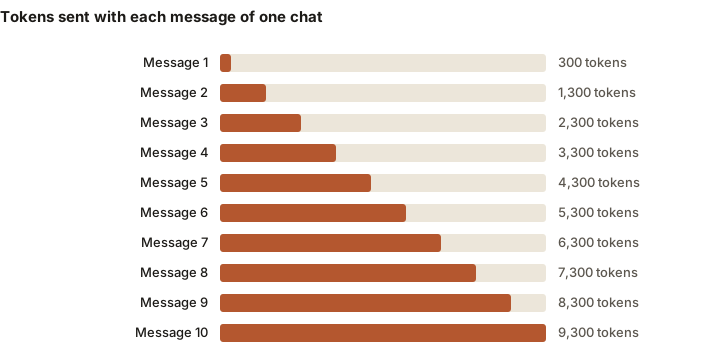
Summarize conversation history. Long conversations accumulate context fast. A 20-turn conversation can easily exceed 10,000 tokens of history. Instead of sending the full thread, summarize earlier turns into a condensed context block. You can use a cheap, fast model to generate the summary -- Gemini Flash handles conversation summarization well at a fraction of the cost of sending the raw history to a frontier model.
Model tiering: right-size the model to the task
Different tasks have wildly different complexity requirements. Routing every request to a frontier model is like shipping every package overnight -- it works, but you are paying a premium for speed and capability you often do not need.
A practical tiering framework:
- Simple classification, extraction, translation -- Gemini 3 Flash or Llama 4 Maverick. These models handle commodity tasks at 10--20x lower cost than frontier models with negligible quality difference for straightforward queries.
- Conversational chat, summarization, moderate analysis -- GPT-5.2 or Claude Sonnet 4.5. Balanced cost-to-quality ratio for the broad middle of most workloads.
- Complex reasoning, code generation, nuanced writing -- Claude Sonnet 4.5 or GPT-5.2 at full context. Reserve frontier models for the queries that actually benefit from their capabilities.
LLMWise Auto mode implements this tiering automatically. Set model: "auto" and the system classifies each query using zero-latency heuristic pattern matching, then dispatches to the appropriate tier. No extra API call, no added latency -- just a regex-based classifier that runs in microseconds before the request hits any provider.
For a deeper dive into cost-driven model selection, see our guide on LLM cost optimization.
Intelligent routing: let your data decide
Static tiering is a good start. Data-driven routing takes it further by learning from your actual usage patterns.
LLMWise optimization policies analyze your request logs to find which models perform best for each query category in your specific workload. The system recommends a primary model and fallback chain, tuned to whichever goal you prioritize:
- Balanced -- optimizes across cost, latency, and quality equally
- Latency-first -- minimizes time-to-first-token and total response time
- Cost-first -- routes to the cheapest model that meets a quality threshold
- Reliability-first -- prioritizes models with the lowest error rates and uses aggressive failover chains
The replay lab validates routing changes before they go live. It takes your proposed routing configuration and replays it against historical traffic, showing you exactly how cost, latency, and quality would have changed. No guessing, no A/B testing in production -- you see the impact before you commit.
For a full walkthrough of how routing works under the hood, see Intelligent LLM Routing Explained.
Latency optimization: make responses feel fast
Raw latency -- the time from request to complete response -- matters less than perceived latency. Users care about how quickly they see something start appearing on screen, not how long the full response takes to generate.
Stream responses with SSE. Streaming via Server-Sent Events returns tokens as they are generated rather than waiting for the full response. Time to first token (TTFT) drops from seconds to milliseconds, and the user sees the response forming in real time. Every LLMWise endpoint supports streaming:
curl -X POST https://llmwise.ai/api/v1/chat \
-H "Authorization: Bearer mm_sk_your_key_here" \
-H "Content-Type: application/json" \
-d '{
"model": "gemini-3-flash",
"messages": [
{"role": "user", "content": "Explain prompt caching in two sentences."}
],
"stream": true
}'
The response streams as SSE chunks:
data: {"model": "gemini-3-flash", "delta": "Prompt caching stores", "done": false, "latency_ms": 45}
data: {"model": "gemini-3-flash", "delta": " the processed representation", "done": false}
...
data: [DONE]
Use circuit breakers for failover. Waiting on a slow or unresponsive model is the worst kind of latency -- the user sees nothing while your backend retries. LLMWise Mesh mode uses circuit breakers that open after 3 consecutive failures, skipping the failed model for 30 seconds before retrying. This eliminates the tail latency spikes that come from waiting on degraded providers.
Query models in parallel. When you need to compare outputs from multiple models, sequential calls multiply your latency. LLMWise Compare mode queries all selected models simultaneously, interleaving response chunks via a shared queue. Total wall-clock time equals the slowest model, not the sum of all models.
Putting it together: a practical workflow
Optimization is iterative, not one-shot. Here is a practical workflow that compounds the techniques above:
-
Start with Auto mode. Set
model: "auto"for your baseline. This gets you heuristic model tiering with zero configuration and gives you a week of usage data to analyze. -
Review traffic patterns. Use the LLMWise dashboard to see how your queries break down by category, which models are handling them, and what the cost and latency distribution looks like.
-
Enable prompt caching. Structure your prompts with stable prefixes first. If you are using Anthropic or Google models, enable provider-level caching. Add application-level caching for your highest-volume repeated queries.
-
Set an optimization policy. Choose your primary goal (balanced, latency, cost, or reliability) and let the optimizer analyze your request history. Review the recommended routing changes.
-
Validate with replay lab. Before deploying new routing, run the replay lab against your last 30 days of traffic. Confirm that the projected cost and latency improvements match your expectations.
-
Monitor and iterate. Optimization is not a one-time event. Model pricing changes, new models launch, and your traffic patterns evolve. Re-run the optimization cycle monthly to capture new savings.
The teams that see the biggest improvements are the ones that stack these techniques. Model tiering alone might save 40%. Add prompt caching and token optimization and you are looking at 50--60%. Layer in data-driven routing with replay validation and the savings compound further -- all without sacrificing the response quality your users depend on.
For detailed cost calculations and implementation steps, see How to Cut Your LLM API Costs.